Getting Started
Overview of CodePup AI
Section titled “Overview of CodePup AI”Welcome to CodePup AI, your no-code partner for building modern websites — from simple landing pages to full-stack web apps — all powered by AI. Whether you’re a business owner, startup founder, developer, or product manager, CodePup helps you turn your idea into a live, functional website with just a few prompts. The platform automatically generates layouts, code, and UI components so you can focus on your vision — not the syntax.
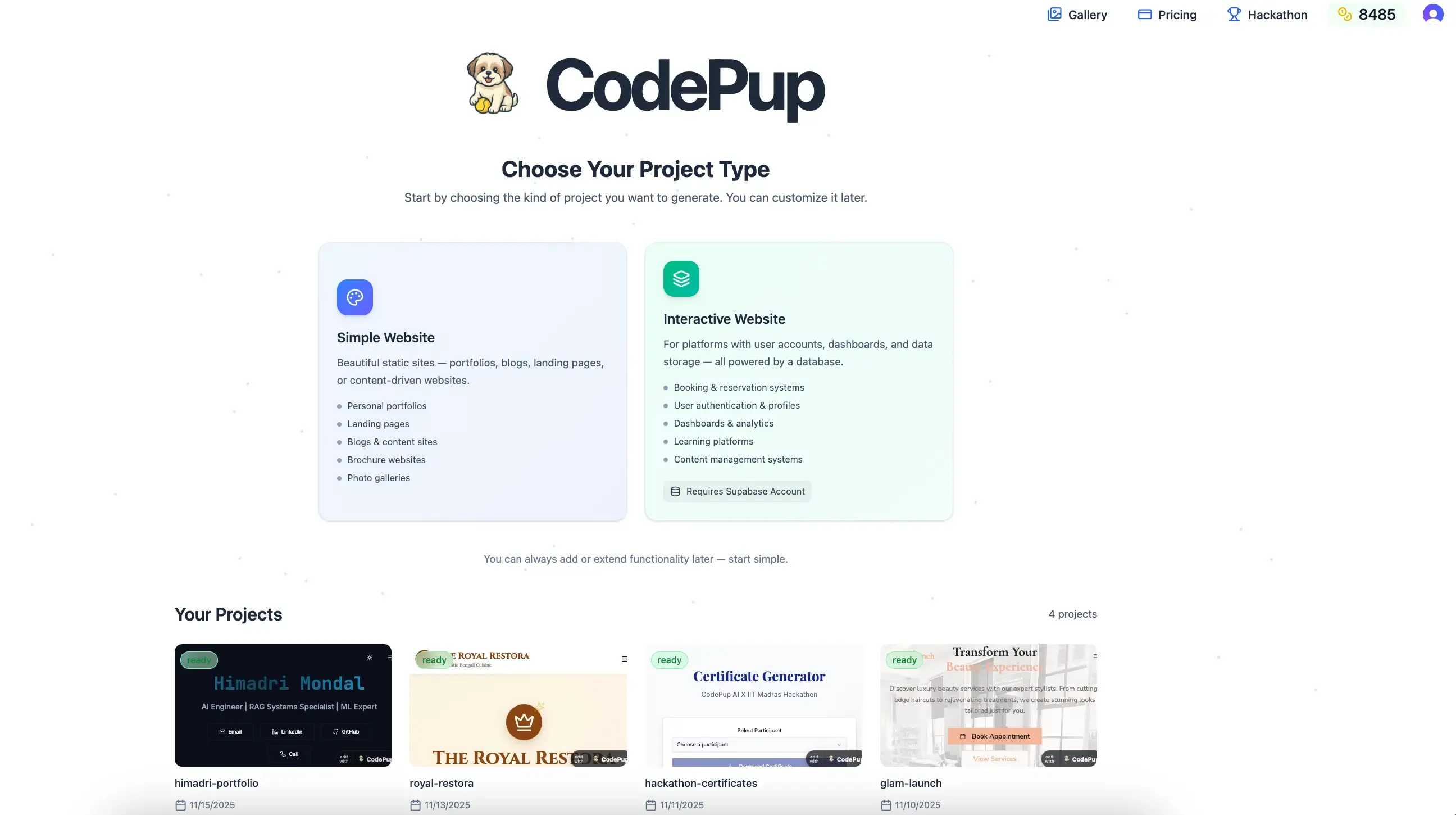
Platform Overview
Section titled “Platform Overview”Create Your First Project
- Visit codepup.ai and sign in to your account.
- After signing in, you’ll land on the Index page where you can view or create projects.
- Choose the type of project you want to create — whether it’s a simple website or a full-stack application.
Describe your website idea in plain English.
- CodePup will instantly generate the full website, including structure, components, and responsive design.
Choosing a Project Type
Simple Website
Section titled “Simple Website”Designed for frontend-only websites such as portfolios, landing pages, or blogs.
Just describe what you want — CodePup automatically handles the design, layout, and responsiveness.
Perfect for:
- Personal portfolios
- Business landing pages
- Product showcases
- Blog or content websites
No database or backend required.
Interactive Website
Section titled “Interactive Website”Ideal for full-stack applications that include backend logic, user authentication, and database connectivity — powered by Supabase.
Perfect for:
- E-commerce platforms
- Booking systems
- Learning platforms
- SaaS or CMS tools
Setup:
Before generating, enter your Supabase Access Token so CodePup can connect to your backend.
Once linked, describe your idea — CodePup will generate a complete frontend + backend solution.
Your Projects Section
After signing in, scroll down to the Your Projects section — your workspace inside CodePup.
From here, you can:
- Start a new project
- Open existing projects
- Check project status (ready, in progress, generating)
- Continue editing anytime
Refine, expand, or redesign using simple chat instructions.
Modify your project
Section titled “Modify your project”Refine Through Chat
Type requests like “Add a pricing section below the hero” — CodePup applies changes instantly.
Add Components
Want polished UI components? Just describe them.
Example:
“Add a pricing section with 4 pricing models below the hero.”
Or paste a component prompt from any UI library (e.g., 21dev) and say:
“Add this to my hero section.”
CodePup integrates it automatically.
Version Control
CodePup’s upgraded Version Control makes it effortless to explore ideas without losing progress.
Jump Back Anytime
Each project stores your latest 20 versions, letting you preview any older version and instantly revert to it.
Want to try a different approach?
Just switch to a previous version and continue building from there — your newer changes stay safe and can be reused anytime.
Simple, Intuitive History
Your version timeline works just like Google Docs — easy to browse, easy to understand, and always in your control.
Click Publish to deploy the selected version instantly.
GitHub Export
Paid users can export generated code directly to GitHub.
Steps:
- Click the GitHub logo in your project chat.
- Select Connect Project.
- Rename the repository if needed.
- For later updates, click Update [branch name] — CodePup pushes changes automatically.
Publish & Deploy
Section titled “Publish & Deploy”Preview and Publish
Preview instantly after generation.
Click Publish anytime — your live link stays the same while new updates apply automatically.
Deploy Full-Stack Apps
For interactive projects, CodePup deploys both frontend and backend, giving you a live, database-connected web app in minutes.
Custom Domain Coming Soon
You will soon be able to connect custom domains via:
- GoDaddy
- Vercel
Feature currently in development.
Full setup guide coming soon.